MealMaster - Recipe Keeper
TikamoriFood & Drink
3.910.00 Reviews
- Version
- 13.7
- Installs
- 10.00K
- Age Rating
- Everyone
Screenshots
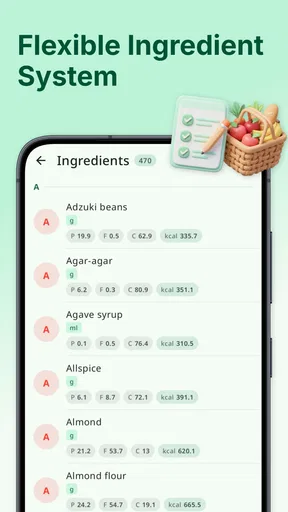
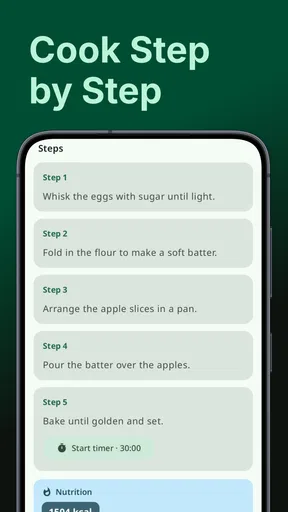
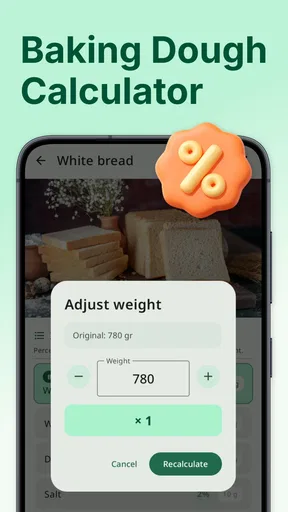
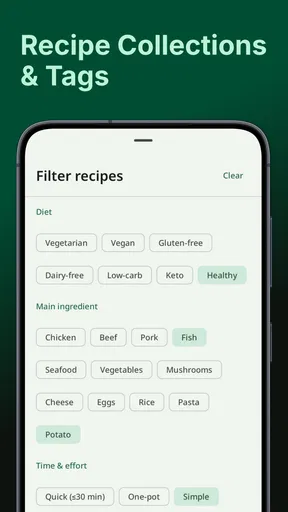
Our Review of MealMaster - Recipe Keeper
 Analysis by Appyee
I tried MealMaster - Recipe Keeper as a practical kitchen companion rather than treating it like a simple recipe notebook. Its purpose is straightforward: help me create recipes, adjust quantities, save useful combinations, and convert servings when the original instructions do not match the number of people I am feeding. That makes it most interesting for home cooks who regularly adapt meals instead of following one fixed recipe.
The app comes from Tikamori and sits in the Food & Drink category. It is free to install, with optional in-app purchases ranging from $2.99 to $28.99 per item. It is rated for Everyone, so the basic idea is approachable for families, students, beginners, and experienced cooks who want a more organized way to handle their own recipes.
My overall impression is that this is less about discovering an endless stream of professionally produced dishes and more about managing the recipes I actually use. That distinction matters. If I want a polished social cooking platform or a large editorial collection, I would look elsewhere. If I want to turn a handwritten recipe into something adjustable and reusable, MealMaster has a clearer reason to exist.
What I would consider before moving my recipes
The first decision is whether I need a recipe library or a recipe workspace. Many cooking apps focus on browsing: I search for dinner ideas, open a page, and follow instructions. MealMaster is more useful when I already have recipes from family, websites, notes, or my own experiments and want to keep them in a consistent format.
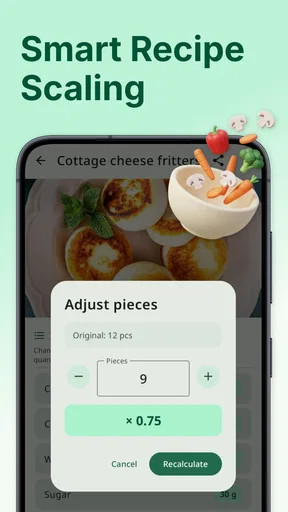
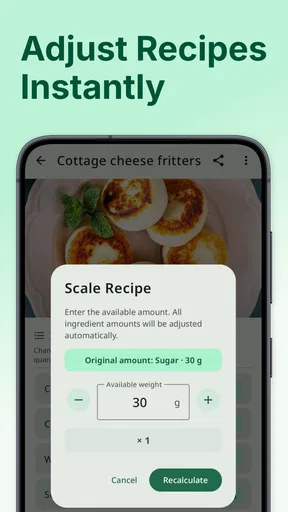
I also looked at how much serving adjustment matters in everyday cooking. A recipe written for four people is not always helpful when I am cooking for one, preparing lunch for two, or making a larger batch for guests. The calculator element gives the app a practical advantage because it turns serving changes into part of the workflow instead of forcing me to do mental arithmetic before I start chopping.
That does not mean every recipe scales perfectly. Doubling flour, rice, vegetables, or a basic sauce is usually easy. Doubling salt, chili, yeast, baking powder, or strong spices may require judgment. I would use the calculator as a reliable starting point, then make a final adjustment based on the ingredient. This is one of the most important habits to develop with any serving tool: mathematical scaling is not the same as culinary scaling.
Another decision point is how much setup I am willing to do. A recipe keeper becomes valuable after I have entered enough of my own material to make it useful. If I only cook occasionally and prefer improvising, the initial organization may feel like work. If I repeat meals, preserve family instructions, or routinely alter portions, that effort pays off much sooner.
Creating a dependable personal recipe system
I found the strongest use case in treating each saved recipe as a working template rather than a frozen document. For example, I could keep a basic soup recipe and adjust the serving count depending on whether I am making a single dinner or preparing several portions for later. The same approach works for pancake batter, pasta sauce, salad dressing, marinades, and batch-cooked grains.
A useful tip is to enter recipes in a way that preserves the logic behind them. Instead of saving vague notes such as “some oil” or “a little garlic,” I would record a repeatable amount whenever possible. That makes the conversion feature more meaningful and helps me understand whether a changed batch is genuinely different or simply larger.
I would also separate recipes that look similar but behave differently. A sauce intended for immediate serving may need a different consistency from one intended for freezing. A family-size casserole may scale well in ingredients but not in cooking time or dish depth. MealMaster can help organize the ingredient quantities, but I still need to record practical notes about texture, pan size, and timing in the recipe itself if those details matter to me.
This is where the app feels more useful than a basic notes app. A note can store text, but it does not naturally encourage me to think in servings and ingredient relationships. Conversely, a general recipe website may offer attractive instructions but may not reflect the way I actually cook. MealMaster sits between those two approaches: more structured than a note, but more personal than a public recipe catalog.
The everyday scenario where it makes sense
Imagine that I am cooking for myself during the week but occasionally have family over. I have one trusted chili recipe written for a larger group. On a normal evening, I can reduce the serving count instead of guessing how much of each ingredient to use. On the weekend, I can increase it again and save the adjusted plan mentally without creating a separate, confusing copy of the recipe.
The same workflow is helpful when shopping. Before going to the store, I can decide how many portions I truly need and use the converted ingredient amounts as a planning reference. This is more useful than copying an unadjusted recipe into a shopping list and discovering later that I bought too much or too little. It also reduces the temptation to prepare an unnecessarily large batch simply because the original recipe was written for more people.
For a student or someone living alone, that can be a real advantage. Recipes written for households often create leftovers by default. Adjusting them down may reduce waste, although I would still check ingredients that do not scale neatly, such as eggs or packaged items. In those cases, the calculator gives me the proportion, while practical cooking determines whether I should use half an egg, substitute, or make the larger batch intentionally.
Where the app wins over ordinary alternatives
MealMaster’s clearest strength is the combination of recipe creation and serving conversion. A notes app is flexible, but I would need to calculate changes manually. A spreadsheet can handle numbers, but it feels unnecessarily technical for a dinner recipe. A printed binder is pleasant for browsing, yet it cannot adjust quantities when the guest list changes.
It is also a better fit than relying on search results every time I cook a familiar dish. Search is useful when I need inspiration, but it can be inefficient when I already know which recipe I trust. Keeping my own version means I can preserve the ingredient balance I prefer instead of repeatedly comparing several similar pages.
Another non-obvious benefit is consistency during experimentation. When I alter a recipe, I can treat the saved version as a baseline. That makes it easier to compare changes: less sugar, a different spice level, a vegetarian substitute, or a larger batch. Without a stable starting point, recipe experiments become difficult to repeat. With one, even imperfect results teach me something for the next attempt.
I would especially recommend this approach to cooks who inherit recipes from relatives. Family recipes often arrive as photographs, messages, or instructions measured “by feel.” Entering a usable version into a recipe tool is not just tidying up; it creates a repeatable record. I would keep the original wording or personal story in my notes where possible, then add measured quantities as I test the dish. That preserves character without sacrificing usability.
The app has reached a 3.9 average from around 150 ratings, with more than 10 thousand installs. Those figures suggest a modest but real user base rather than a dominant mainstream platform. I would not interpret that as a quality guarantee, but it does help set expectations: this feels like a focused utility for a particular cooking habit, not an all-purpose food ecosystem.
Where another type of app may fit better
I would choose a different category of app if my main goal were recipe discovery. Someone who wants daily inspiration, step-by-step cooking media, restaurant ideas, or a large community may find a dedicated discovery service more satisfying. MealMaster’s value starts after I decide which recipes I want to keep and manage.
I would also look elsewhere if collaboration is central to my kitchen. For a household that needs shared grocery lists, meal calendars, or coordinated cooking tasks, a broader planning tool may be a better match. MealMaster’s focused recipe workflow is appealing precisely because it avoids trying to become every kind of food app, but that focus means it may not replace a household organizer.
People who rarely modify portions may not gain enough from the calculator to justify changing their routine. If I always cook the same meal for the same number of people, a familiar cookbook or a simple note may be faster. The app becomes more compelling when serving sizes change, recipes evolve, or I need one place for personal cooking records.
There is also a learning curve in translating informal cooking into structured entries. Experienced cooks often rely on visual cues, tasting, and flexible quantities. For them, a precise recipe format can feel restrictive. My workaround would be to include flexible notes alongside measured ingredients, rather than pretending every dish follows laboratory rules. This keeps the app useful without losing the instinctive side of cooking.
Another limitation is that a calculator cannot solve every scaling problem. Cooking time may not increase in direct proportion to servings. A larger casserole may require a different dish and a longer bake, while a reduced cake recipe may behave differently because eggs and leavening do not divide cleanly. I would never follow a converted number blindly for baking, fermentation, pressure cooking, or recipes where vessel size changes the result.
Practical habits that make the tool more useful
My first recommendation is to create a small core collection instead of entering everything at once. I would begin with five recipes I cook repeatedly: perhaps a breakfast, a main dish, a sauce, a baked item, and one flexible leftover meal. This quickly tests whether the organization style suits me without turning setup into a separate project.
Second, I would save a recipe only after I have cooked it at least once or have cleaned up the original instructions. A recipe copied in a hurry can preserve missing steps, ambiguous quantities, or inconsistent units. The best time to improve it is immediately after cooking, while I still remember what needed correction.
Third, I would use serving conversion before shopping, not only at the stove. Deciding the target batch early helps me buy appropriately and makes leftover planning more deliberate. If I want lunches for several days, I can increase the recipe intentionally; if I am trying to avoid waste, I can reduce it while checking which ingredients need sensible rounding.
Fourth, I would treat saved recipes as versions of my own cooking. If I change an ingredient significantly, I would avoid overwriting the dependable version until I know the experiment works. That protects the recipe I already trust and gives me a useful comparison point. This is a small organizational habit, but it prevents a failed experiment from becoming the only version I have.
Finally, I would not use the app as a substitute for food safety judgment. Adjusting portions does not automatically adjust cooling, storage, reheating, or shelf-life decisions. For batch cooking, I would still divide food appropriately, cool it safely, and use my own judgment about storage. A recipe calculator handles quantities; it does not manage the risks around prepared food.
What switching from paper or notes really involves
The cost of switching is mostly time and attention rather than money, since the app is free to install. The optional purchases may matter if I decide I need paid elements, so I would explore the basic workflow before committing to any purchase. The important question is not simply whether the app costs nothing at the start, but whether its method saves enough effort in my own cooking routine.
Moving from paper requires transcription. I would expect to spend time standardizing ingredient names, checking quantities, and deciding which personal notes belong with each recipe. That can feel tedious, especially for a large collection. I would not migrate an entire cookbook immediately; I would start with recipes I actually prepare and leave sentimental or rarely used material untouched until the system proves worthwhile.
Moving from a notes app has a different trade-off. Notes are quick and forgiving, while a recipe-focused tool asks me to think more carefully about servings and quantities. In return, I get a more purposeful workflow for adjustments. If my current notes already work and I never resize recipes, switching may create friction without a meaningful payoff.
The app is currently at version 13.7 and supports devices using Android 9 or later. For someone with an older phone, that compatibility point is worth checking before planning a migration. On a supported device, I would still test a few representative recipes first: one simple dish, one recipe with fractions, and one recipe whose ingredients do not scale cleanly. That reveals more than entering only an easy example.
I would also decide how much trust to place in converted quantities. For pantry staples and straightforward sauces, the result can be a helpful guide. For baking, spice-heavy dishes, and recipes involving whole eggs, I would use the calculated amount as a reference and apply culinary judgment. The app reduces arithmetic; it does not remove the need to understand why an ingredient is there.
My recommendation for different kinds of cooks
I recommend MealMaster to home cooks who repeatedly adapt recipes, cook for changing numbers of people, or want to turn scattered personal instructions into a usable collection. It is particularly suitable for someone who has a handful of dependable dishes and wants to make them easier to repeat. The combination of creating recipes, saving them, and changing serving quantities gives it a practical identity.
I would recommend starting slowly: enter a few real recipes, use the calculator during an actual week, and judge whether the saved versions are easier to follow than the originals. If the answer is yes, continue building the collection. If the process feels like more administration than cooking, a simple notes app or printed book may remain the better choice.
I would not choose it as my first option for a social cooking experience, extensive meal planning, or constant recipe browsing. Those needs belong to broader alternatives. MealMaster is strongest when I already know what I like and want control over how those recipes are recorded and adjusted.
For me, the app’s appeal is its modest focus. It does not need to replace every kitchen tool to be useful. It simply makes personal recipes more adaptable, and that solves a problem I encounter whenever the serving count changes or an old recipe needs a cleaner home. If your cooking is built around repeatable recipes rather than endless browsing, MealMaster is worth trying before you pay for a more complicated system.
Verdict
Strengths of MealMaster - Recipe Keeper
- Keeps recipes organized in one convenient, searchable place.
- Useful for saving personal recipes and favorite meal ideas.
- Makes it easier to revisit recipes while cooking.
- Can help reduce reliance on scattered notes or screenshots.
- Suitable for users building a personal digital cookbook.
Limitations of MealMaster - Recipe Keeper
- Recipe organization may require manual entry and ongoing maintenance.
- Some advanced features may be limited behind in-app purchases.
- The usefulness depends on the quality of recipes you add or import.
- Large recipe collections may take time to categorize properly.
- Not ideal for users seeking detailed meal planning or nutrition tracking.
Other Releases by Tikamori
View All
FaceAge - How old do I look
Beauty3.7

Face Shape: Beauty Scanner AI
Beauty0.0
Similar Picks in This Category
View All
Rappi: Food Delivery, Grocery
Rappi, Inc - Delivery3.5

McDonald’s: Cupons e Delivery
Arcos Dorados4.3

Swiggy: Food Instamart Dineout
Swiggy4.7

Blinkit: Groceries & more
Blinkit4.8

foodpanda: food & groceries
Foodpanda GmbH a subsidiary of Delivery Hero SE4.0

Zomato: Food Delivery & Dining
Zomato4.7
Frequently Asked Questions
What is MealMaster - Recipe Keeper used for?
MealMaster - Recipe Keeper is designed to help you organize, save, and manage recipes in one convenient place. You can use it to keep personal recipes, browse your collection, add ingredients and preparation instructions, and refer to them while cooking. It is particularly useful for replacing scattered notes, screenshots, bookmarks, or printed recipes with a more structured digital cookbook.
Can I add my own recipes to MealMaster - Recipe Keeper?
Yes, the app is intended for building a personal recipe collection, so you can generally add your own dishes and customize details such as the recipe name, ingredients, cooking steps, preparation time, servings, and notes. This makes it suitable for family recipes, meal ideas, baking instructions, and recipes adapted to your preferences. Always check the current app version for the exact editing and customization options available.
Does MealMaster - Recipe Keeper work offline?
Whether every feature works without an internet connection may depend on the version of MealMaster - Recipe Keeper and how recipes are stored or synchronized. Recipes already saved on your device may remain accessible offline, which is convenient when cooking in a kitchen with limited connectivity. However, downloading new content, syncing data, or using online-related features may require internet access.
Is MealMaster - Recipe Keeper free to download and use?
MealMaster - Recipe Keeper may be available as a free download, but some functions could depend on the app’s current pricing model. Depending on the platform and version, users may encounter advertisements, optional in-app purchases, premium tools, or limitations on certain features. Before downloading, review the Google Play Store or Apple App Store listing carefully to confirm what is included at no cost.
Is MealMaster - Recipe Keeper suitable for beginners and experienced cooks?
The app can be useful for both beginners and experienced cooks because its main purpose is to keep recipes organized and easy to consult. Beginners may appreciate having ingredients and instructions clearly arranged, while experienced users can use it to store variations, cooking notes, and favorite dishes. Its usefulness ultimately depends on how intuitive the interface and recipe-management tools feel on your device.
